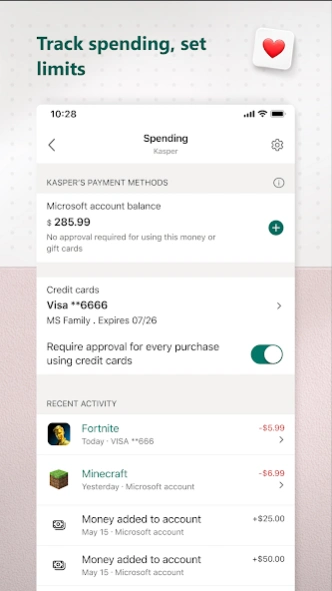
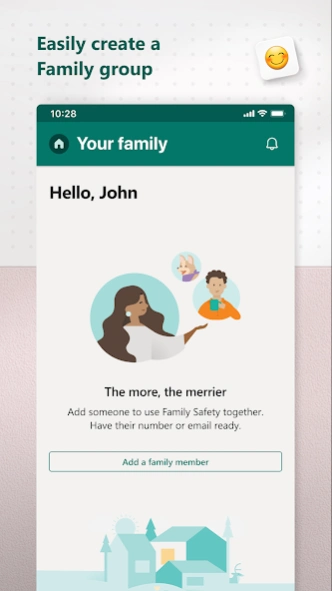
About Microsoft Family Safety
The Microsoft Family Safety app helps empower you and your family to create healthy habits and protect the ones you love. Get peace of mind that your family is staying safer while giving your kids independence to learn...
The Microsoft Family Safety app helps empower you and your family to create healthy habits and protect the ones you love. Get peace of mind that your family is staying safer while giving your kids independence to learn and grow.
This app is designed for both parents and kids.
For parents, it helps to create a safe space for their children to explore online. Set parental controls to filter inappropriate apps and games and set browsing to kid-friendly websites on Microsoft Edge.
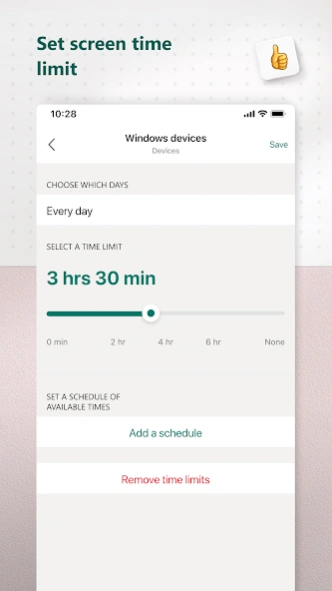
Help your kids balance their screen time activity. Set limits for specific apps and games on Android, Xbox, or Windows. Or use device management to set screen time limits across devices on Xbox and Windows.
Use activity reporting to better understand your family's digital activity. View your kids’ activity in a weekly email to help start a conversation about online activity.
For kids, it ensures their safety in the digital world by adhering to parental controls and accessing age-appropriate content.
Microsoft Family Safety features:
Activity reports – Develop healthy digital habits
• Activity log of screen time and online usage
• Weekly email summary report of activity
Screen time – Find a balance
• Screen time app and game limits on Xbox, Windows, Android
• Screen time device limits on Xbox and Windows
• Get notified if your child requests more time
Content filters – Explore safely
• Web filters for kid-friendly browsing on Microsoft Edge
• Block inappropriate apps and games
Privacy & Permissions
Your privacy is important to us. We work around the clock to protect your data and information to help you keep your family safe. For example, we do not sell or share your location data with insurance companies or data brokers. We provide you with meaningful choices about how and why data is collected and used and give you the information you need to make the choices that are right for you and your family.
With your child’s consent, Microsoft Family Safety may collect interaction data using accessibility, app usage, and device admin service permissions. This allows us to: know when they are using an app, exit an app on their behalf, or block apps that are not allowed.
Disclaimers
This app is provided by either Microsoft or a third-party app publisher and is subject to a separate privacy statement and terms and conditions. Data provided through the use of this store and this app may be accessible to Microsoft or the third-party app publisher, as applicable, and transferred to, stored and processed in the United States or any other country where Microsoft or the app publisher and their affiliates or service providers maintain facilities.
Previous Versions
Here you can find the changelog of Microsoft Family Safety since it was posted on our website on 2020-07-30 10:23:09.
The latest version is 2.0.8.1169 and it was updated on 2026-10-12 18:56:49. See below the changes in each version.
Microsoft Family Safety version 2.0.8.1169
Updated At: 2026-09-25
Changes: - General bug fixes.
Microsoft Family Safety version 2.0.5.1103
Updated At: 2026-04-14
Microsoft Family Safety version 2.0.1.1046
Updated At: 2024-12-05
Changes: - As previously announced, Drive Safety and Location Tracking features have been removed.
- Several stability improvements and bug fixes.
Microsoft Family Safety version 1.26.2.1015
Updated At: 2024-03-20
Changes: - Location Sharing Bug fix.
Thank you for using our app! We're always working to improve your experience, so please keep the feedback coming.
Microsoft Family Safety version 1.26.0.1001
Updated At: 2024-01-15
Changes: - Revamped experience in accordance with changes in family.microsoft.com.
Microsoft Family Safety version 1.24.2.962
Updated At: 2023-03-31
Changes: - Review location settings.
Microsoft Family Safety version 1.24.1.958
Updated At: 2023-03-31
Changes: - Feature improvements around location-based features.
Microsoft Family Safety version 1.17.1.805
Updated At: 2022-05-08
Changes: Dinner's ready, devices off: You asked for a way to lock devices instantly, and we heard you! Now you can lock (and resume) your child's devices. *Note: Only Xbox and Windows 11 devices are supported.
Now you can manage what data you share with us by tapping Help and Feedback > Privacy management.
We'd be sorry to see you go, but if you need to delete your account for any reason, you can now start the process from the app.
Microsoft Family Safety version 1.19.1.864
Updated At: 2022-05-08
Changes: Screen time usage for today is now available with a quick glance at the family overview page.
Adding funds to your kids' Microsoft Store account is easier than ever; get notifications for completed purchases and the successful addition of funds.
Microsoft Family Safety version 1.16.0.771
Updated At: 2022-02-18
Changes: Accept pending invites directly from your mobile device.
New alerts will let you know when your child's Windows, Xbox, or Android devices need attention, ensuring settings work as expected.
Adding money to your child's Microsoft account is easier than ever; push notifications sent for purchase requests.
Disclaimer
Official Google Play Link
We do not host Microsoft Family Safety on our servers. We did not scan it for viruses, adware, spyware or other type of malware. This app is hosted by Google and passed their terms and conditions to be listed there. We recommend caution when installing it.
The Google Play link for Microsoft Family Safety is provided to you by apps112.com without any warranties, representations or guarantees of any kind, so access it at your own risk.
If you have questions regarding this particular app contact the publisher directly. For questions about the functionalities of apps112.com contact us.